Measured in real production, not on a demo.
A figure is only worth its method: which fields, which documents, what share of human validation. We publish all of it, and we replay the same method on your own documents during the pilot, before any commitment.
The measurement method, field by field →
The whole transport document chain.
The engine recognizes 36 transport document types, grouped into 14 families — delivery, transport, ordering, picking, dispatch, collection, invoicing, receiving, returns, logistics — and extracts the type, number, date and issuer on each of them. On the delivery note, extraction is complete: consignee and line items. For any other document — CMR consignment note, transport order, proof of delivery, or a document specific to your business — the model is fine-tuned on your samples during the pilot, up to full extraction.
The document the engine is measured on: 195,000 real delivery notes processed in production, 2,365 layouts.
Recognized, numbered and dated out of the box; boxes, handwritten reservations and stamps fully extracted once fine-tuned on your CMRs.
Received by email, PDF or spreadsheet: identified and dated out of the box; once fine-tuned on your orders, it becomes an order in your TMS with no rekeying.
Recognized and matched to the order; signature, date and reservations extracted after fine-tuning, so the proof goes to invoicing the same day.
Checked line by line against the order and the rate card; only the discrepancies are flagged.
The upstream and downstream documents of the same chain, for a full order ↔ delivery ↔ invoice reconciliation.
Not raw text: data.
Classic OCR returns characters. The engine returns named fields, normalized and matched against your reference data, ready to go into the TMS.
Out of the box, with no setup.
The consignee, matched to your sites, and the line items — references, quantities, units, weights, batches, packages.
Whatever the written format, normalized.
Supplier, carrier or shipper — identified even when the letterhead changes.
Site, warehouse or customer delivered to.
Delivery note, CMR, order, POD, invoice: classified automatically within the flow.
Plus the related numbers: purchase order, transport order, customer reference.
References, descriptions, quantities, units, weights, batches, packages — as a structured table.
{
  "type": "bon_de_livraison",
  "numero": "BL-2026-04871",
  "date": "2026-09-09",
  "emetteur": { "nom": "…", "siren": "…" },
  "destinataire": { "site": "Entrepôt Perpignan" },
  "commande_ref": "CMD-77120",
  "lignes": [
    { "ref": "MV-310", "designation": "Carottes sable — sac 10 kg", "qte": 60, "unite": "sacs", "poids_kg": 600.0 }
  ],
  "confiance": { "date": 0.99, "emetteur": 0.98, "destinataire": 0.97, "numero": 0.96 },
  "etat": "AUTO",
  "a_valider": []
}
Field names are those of the production API schema (French keys): type, number, date, issuer, consignee, order reference, line items, per-field confidence, status, fields to review.
Document → data, real extraction.
Four fictitious delivery notes — invented companies, addresses and references, no customer data — run through the production engine on September 12, 2026. The document on the left, what comes out of it on the right, with the fields sent for review highlighted.
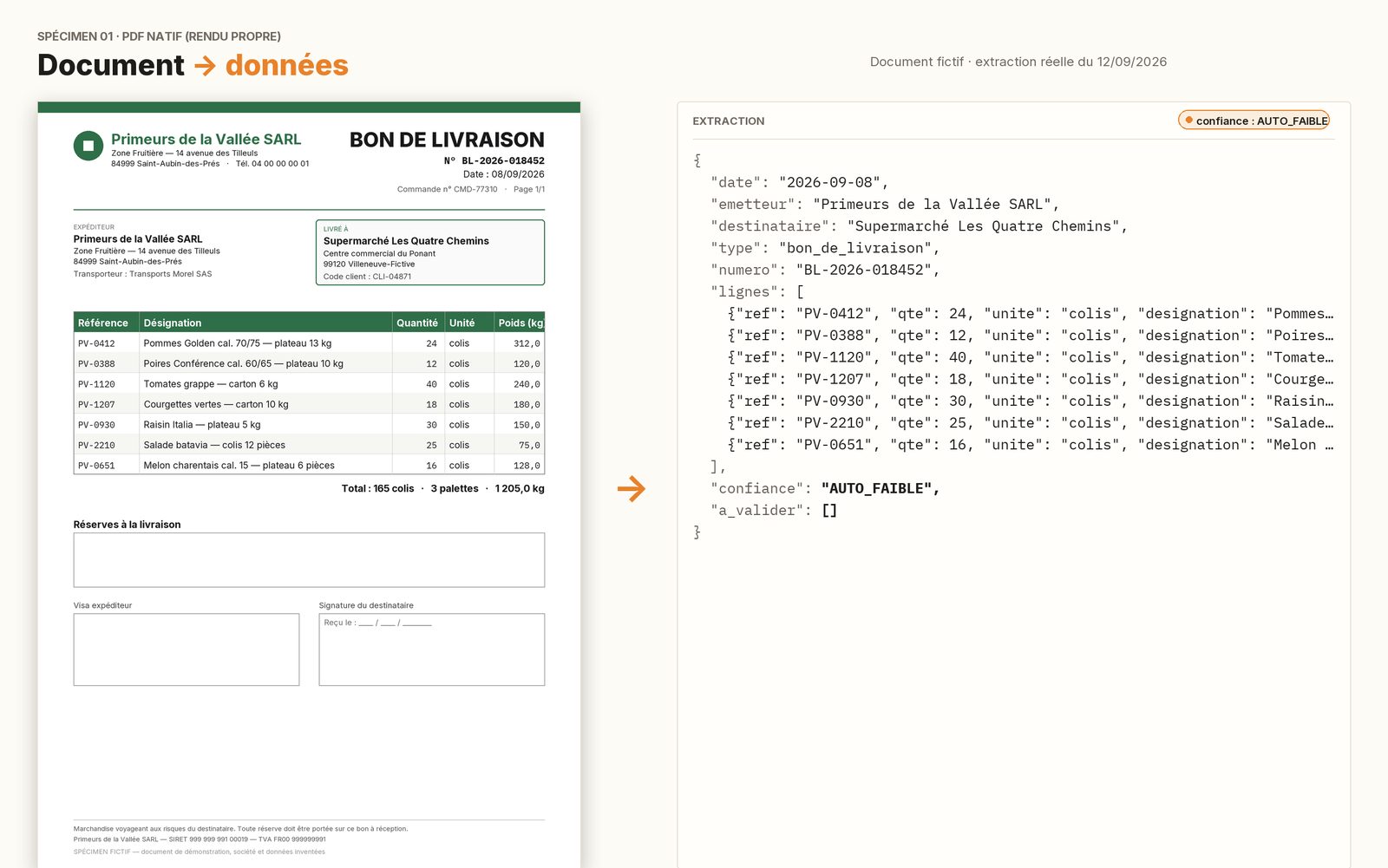
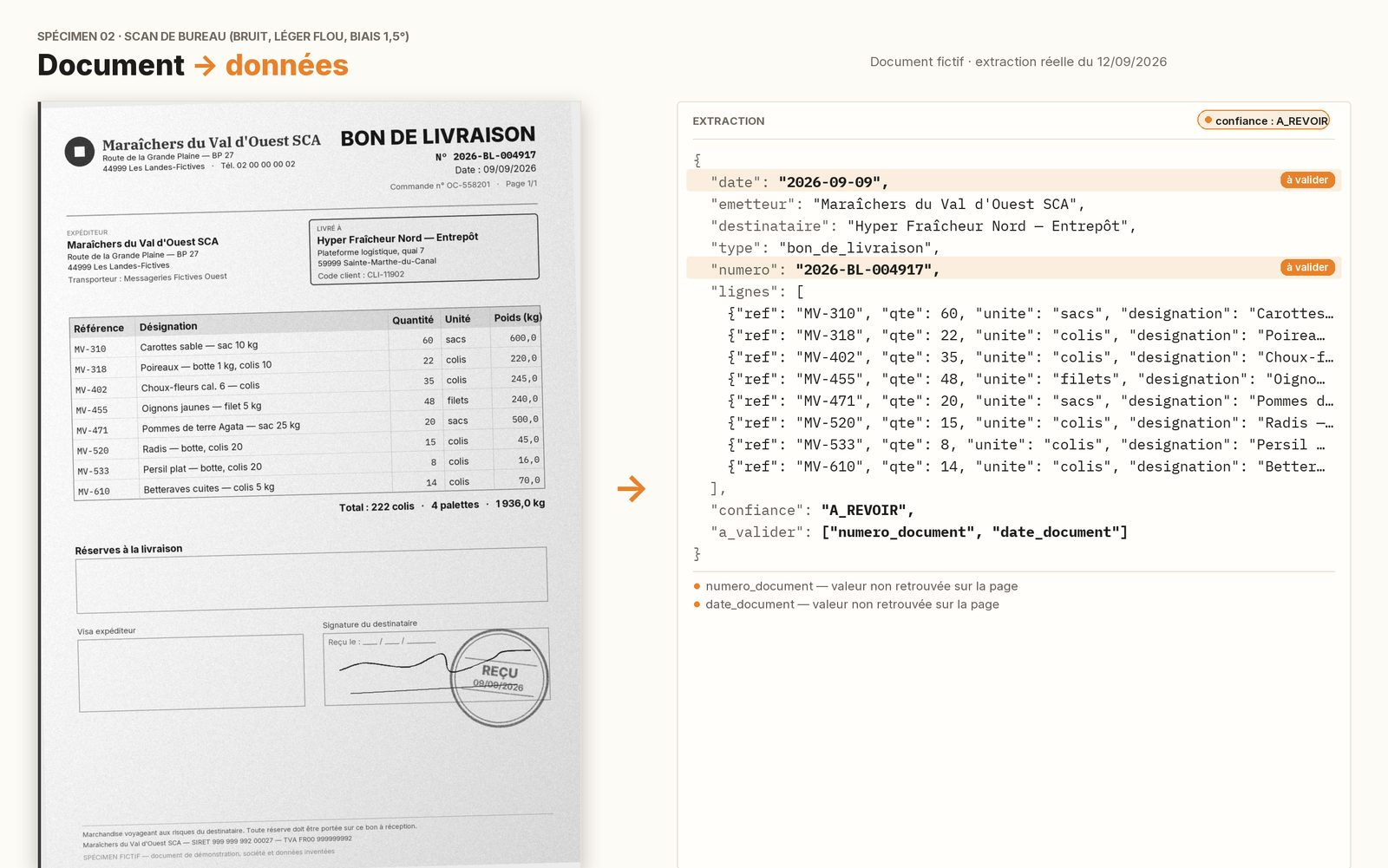
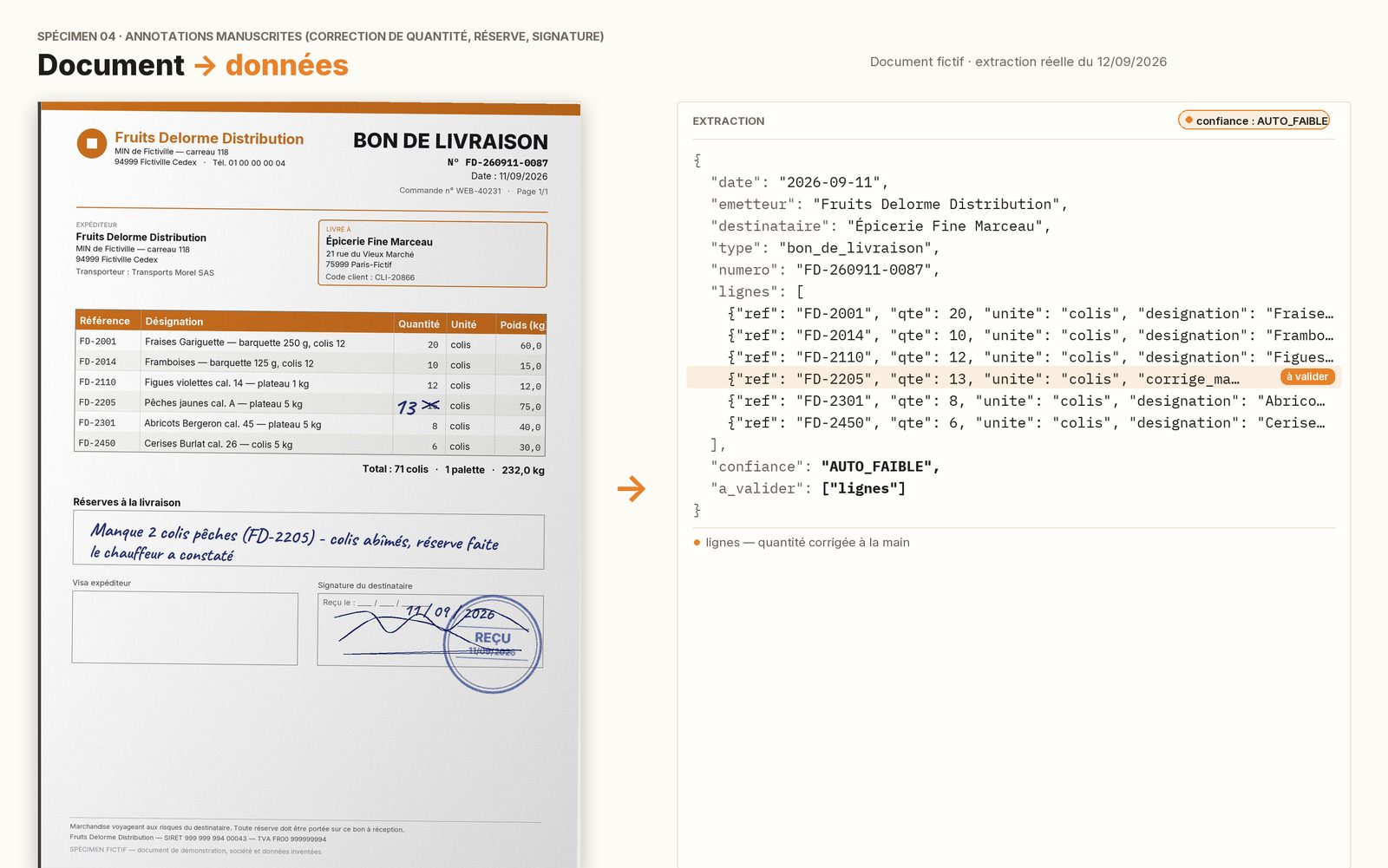
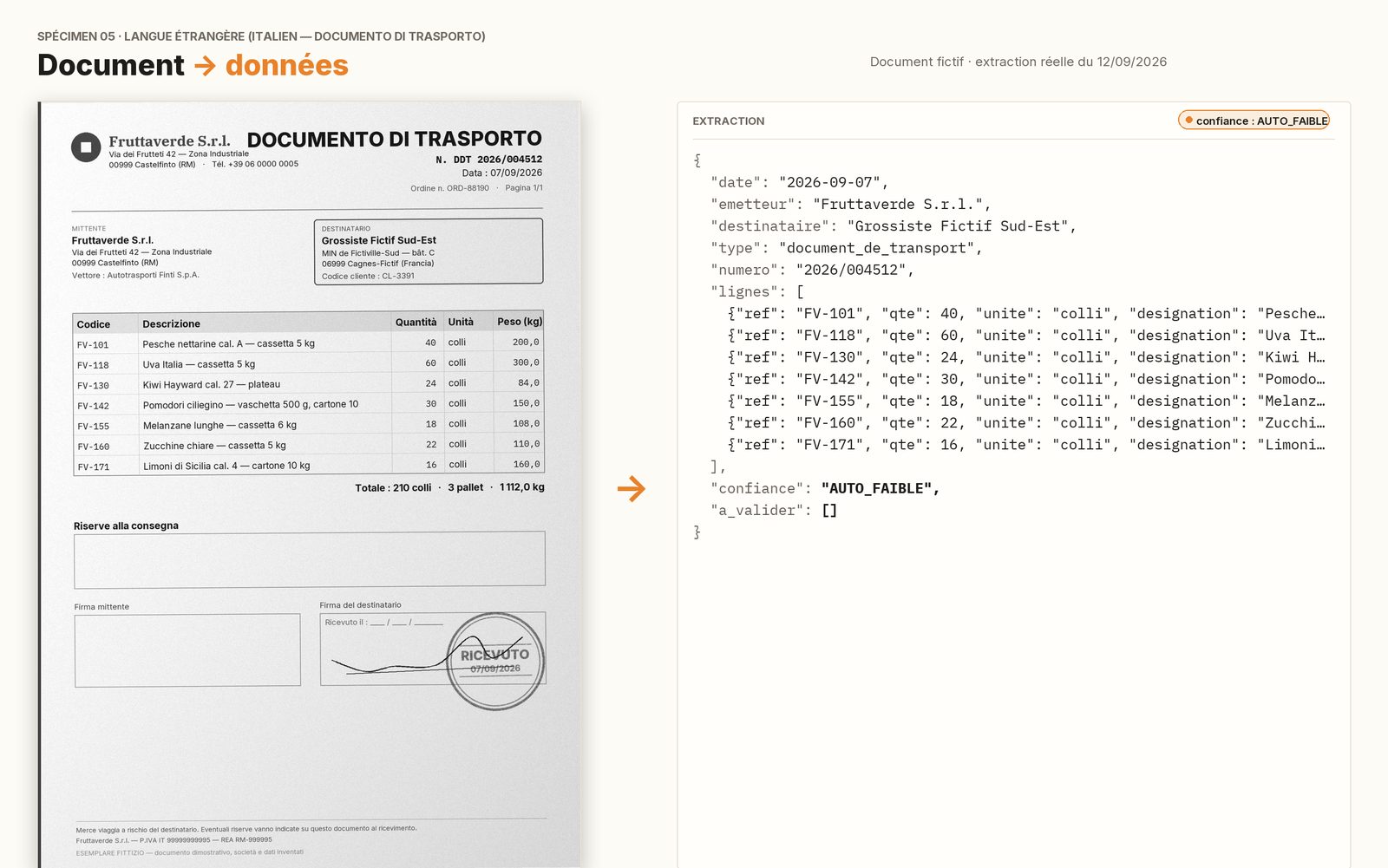
Synthetic samples; recognition and field reading by the production services. No real document is published.
OCR to read, reasoning to understand.
Two stages: an OCR robust to scans and photos, then a specialized language model that interprets the document the way a dispatcher would — which issuer, which order, which lines, which reservation. That second stage, trained on millions of transport documents, is what sets it apart from template-based OCR.
- 01Capture
PDF dropped via API, into a watched folder, a SharePoint library or by email: the document comes in through the channel you already use.
- 02Read
The document is deskewed and OCR reads the text, scans included; the specialized model understands what each zone means — not just the characters.
- 03Structure
Fields are extracted, normalized and matched against your reference data: suppliers, items, open orders.
- 04Check
Every field carries a confidence score. What is certain goes through; what is not is highlighted for a person.
- 05Write
Validated data is written into your TMS or ERP, or exported (JSON, CSV, API, webhook). The document is archived with its extraction.
Non-negotiable principle: the AI never guesses silently. Every field carries a confidence score; below the threshold, a person decides, and their correction is used to fine-tune the model on your layouts.
Every correction your team makes is worth two hundred.
The engine does more than read: it learns from the dispatcher. When a person validates or corrects a field, that verdict is memorized for the document’s layout, and every document of the same layout still pending is re-adjudicated on the spot — a median of 197 documents per verdict, measured in production. That is how the share of validated documents went from 63% cold to 99.3% over 195,000 documents: a few dozen human corrections, thousands of documents learned.
A dispatcher’s correction is authoritative: it is memorized, time-stamped, and a refuted value never comes back through automatic validation.
Documents from the same issuer still in the queue are revalidated in one go. On September 1, 2026, eleven verdicts validated 1,022 documents.
Automatic cross-checks run continuously, and 1.5% of the documents validated automatically are re-served to a person as a random audit.
Keep your TMS. We automate what goes into it.
Switching TMS to get automated document reading means running a migration project to solve a data-entry problem. The AIR.TEK engine is an intelligence layer added on top of your current system, whatever it is: REST API, webhooks, SFTP drop or shared folder, watched mailbox, CSV and JSON exports. Mapping to your fields is set during setup, and nothing is written into the TMS without going through the check.
Automated entry into your TMS: the details →
Your volume doubles? Your bill does not.
The document-reading market bills per page, per credit or by meter: the cost tracks your activity, and the meter resets to zero every year. The AIR.TEK engine is installed on your premises and licensed annually. The millionth document costs the same as the first: nothing.
* within your server’s capacity — the only limit is physical, not contractual.
The engine runs on a server on your premises. Delivery notes, CMRs, negotiated rates, customers: nothing is sent to a remote AI service. It even works without an internet connection.
An annual license, unlimited volume within your server’s capacity. At several thousand documents a day, the cost is known in advance — it does not climb with your activity.
Your validations feed the model installed on your premises. It gets better on your suppliers, your sites, your habits — and that progress stays with you.
The server installed on your premises (SABER) → Sovereignty & GDPR →
Transport engine, generic OCR or a TMS switch.
| Generic online OCR | AI built into a new TMS | AIR.TEK transport engine | |
|---|---|---|---|
| Trained on transport documents | No, generic models | Sometimes, on the vendor’s layouts | Yes — measured on 195,000 real delivery notes, 2,365 layouts |
| Document types | A few predefined families | The vendor’s | 36 types in 14 families; full extraction on delivery notes, fine-tuning on your other types |
| Adapted to your documents | Templates to configure | Depends on the vendor | Fine-tuned on your layouts during the pilot |
| New supplier, unknown layout | A new template to build | Depends on the vendor | Read with no setup; sent for review if in doubt |
| Where your documents go | The provider’s cloud | The vendor’s cloud | On your server, on your premises |
| Your TMS | You keep it | You switch TMS | You keep it |
| Cost at high volume | Per page or per credit — climbs with volume | Included in a TMS contract | Annual license, unlimited volume within the server’s capacity |
| Accuracy | Claimed, rarely detailed per field | Claimed | 99.3% of documents validated; field-level accuracy published |
| Throughput | Depends on the plan and the API quotas | Depends on the vendor | Up to 10,000 documents / hour (baseline deployment, measured) |
And versus ChatGPT on documents? The comparison (FR) →
People, hours per week, profile: the calculator gives the hours consumed each month and the capacity they represent. Nothing is stored.
Logistics document OCR: your questions.
What exactly are your figures worth?
They come from real production at one customer: 195,514 delivery notes processed, 99.3% validated — 97.9% with no human touch, 1.4% validated in bulk after a handful of corrections taught the system their layout — and that rate rises with use. Against human-verified ground truth, on documents validated automatically, the issuer is correct 99.4% of the time, the date 98.9%, the number 94.4%. On issuers never seen before, the number is read at 96.4% and the date at 97.2% before any resolution. A damaged document is still processed — 100% of documents are handled — and its uncertain fields are flagged, never invented. The full method is on the benchmark page.
How fast is it?
10,216 documents per hour on average over a full campaign, 7,788 in steady state, measured on the baseline deployment installed at a customer’s site — one server, one server-class GPU. The actual throughput on your documents and your server is measured during the pilot.
Do you read handwritten, damaged or foreign-language documents?
Yes, and they are part of the real flow that was measured: degraded or skewed scans, handwritten annotations (3,899 documents flagged by the detector), international consignment notes in foreign languages (1,475). All are processed — no document is rejected. In every case, when the read is uncertain, the field is highlighted and a person validates it: the AI never guesses silently.
Which document types do you recognize?
Thirty-six transport document types, grouped into fourteen families, identified on more than 3,500 real pages: delivery note, domestic and international consignment note (CMR), transport note, transport confirmation, transport order, purchase order, order confirmation, picking list, dispatch note, pallet sheet, loading list, collection note, pick-up note, invoice, return note, and their Spanish and Italian variants. On each of them the engine extracts the type, number, date and issuer out of the box. Full extraction — consignee, line items — is trained on the delivery note and extends to your other types through fine-tuning.
Can you handle a document specific to my company?
Yes. The model is fine-tuned on any document type from your own samples: we define the fields to extract together, measure on a sample during the pilot, then go live with human validation of the uncertain cases.
What if a supplier sends a layout we have never seen?
The engine does not rely on templates. On 1,000 documents from 127 issuers never seen during training, it reads the number at 96.4% and the date at 97.2% on the raw read alone. The first documents from an unknown issuer are validated with a reservation or by your team, and each validation memorizes the layout for the next ones.
Do I have to switch TMS or ERP?
No. The engine is added to what you already have: API, webhooks, SFTP drop or folder, watched mailbox, CSV/JSON exports. Mapping to your TMS fields is done during setup.
Do my documents leave the company?
No. The engine is installed on a server on your premises. Documents, extractions and the model stay with you; nothing is sent to a remote AI service.
How is it priced?
With an annual license and unlimited volume, within your server’s capacity — not per page or per credit. At several thousand documents a day, that is what keeps the cost predictable. The amount is quoted after a free 30-minute first call, based on the scope and the server.
What exactly does the license cover?
One legal entity, one production environment, for your internal needs — with an unlimited number of documents and users within the server’s capacity. An additional site or subsidiary, a second production server, an additional document family or a higher service level is an extension, quoted separately.
How long does it take to get started?
A few weeks for a first flow: server installation, connection of the intake channel and the TMS, a measured pilot on your documents, then go-live with human validation of the uncertain cases.
Can we test on our own documents before deciding?
Yes — that is actually the rule: we measure accuracy on a sample of your real documents during the pilot, field by field, before any commitment.